How to understand a large codebase.
Nobody learns a big codebase by reading it from the first file to the last. This is a seven-step method that works in any language. Each step says what to do by hand and how a code map shortens it.
Why reading top to bottom fails
A large codebase has more code than you can hold in your head, and most of it does not matter for the task in front of you. People who get productive quickly do not read more than everyone else. They build a rough map first, then read deeply only along the paths they need.
The steps below build that map in order: the outside of the system first, then its big pieces, then one path through it in detail.
1. Run it before you read it
Get the application running on your machine and use it like a customer would. Sign up, create something, break something. You will learn the vocabulary of the product, and every name you meet later in the code will already mean something.
Getting it to run also shows you the moving parts: which services start, which database it needs and which environment variables it expects.
2. Find the entry points
Code only runs because something starts it. List those starting points, because everything else hangs off them.
- HTTP routes and API endpoints.
- Pages and screens in the user interface.
- Background jobs, queues and scheduled tasks.
- Command-line commands and the main function.
By hand, search for the framework's route definitions and read the router files. In a big application the routes are often spread over dozens of files, so write them down as you go.
With Nodeway
Routes are found automatically in 13 frameworks and listed in one place. The sidebar shows how many routes and tables the repository has as soon as the map is ready.
3. Map the big pieces
Before opening individual files, work out the main parts and which way the dependencies point. Ask three questions about each top-level folder or package: what is it for, what does it depend on, and what depends on it.
By hand, read the README, the package manifests and the folder tree, then sketch boxes and arrows on paper. Five to ten boxes are enough. The sketch will be wrong in places, and correcting it is how you learn.
With Nodeway
Open the folder and the map shows packages, folders and files with the imports and calls between them. Expand only the part you care about and leave the rest collapsed.
4. Trace one request end to end
This is the step that pays back the most. Pick one real feature, such as signing in or creating an order, and follow it from where the request arrives to where the data is stored.
By hand, start at the route, jump to each function it calls and keep notes as you go. Note every layer you pass through: validation, services, helpers, database queries. Most applications repeat the same layers for every feature, so one complete trace teaches you the pattern for all of them.
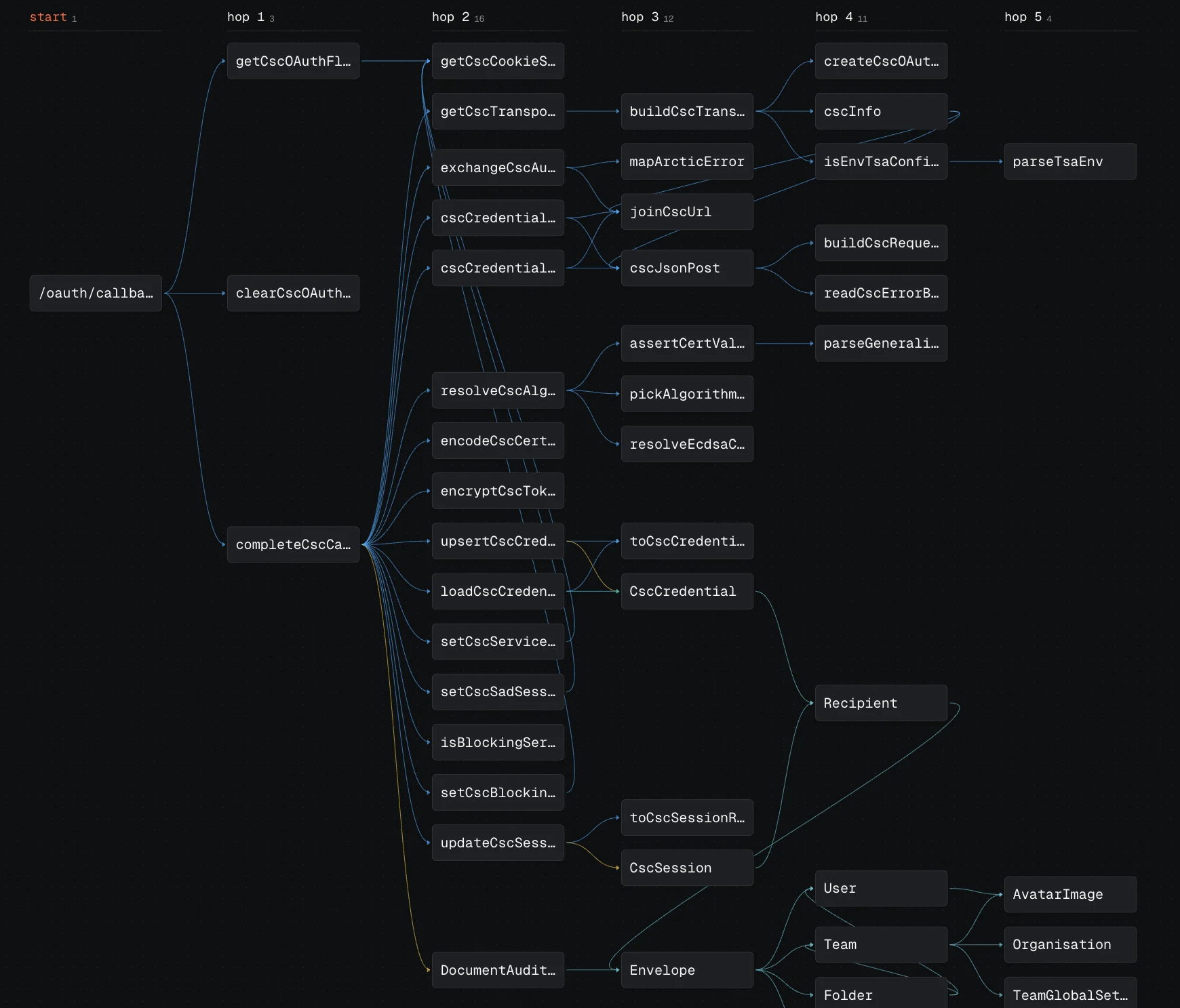
With Nodeway
Select a route and start a trace. The map follows the calls hop by hop and ends at the exact tables the request reads and writes, with the code for each hop beside it.
5. Read the data model
Tables change far more slowly than code, and they describe what the business actually stores. Read the schema or the ORM models and note the main entities and how they relate. Ten minutes with the schema often explains more than a day in the service layer.
Then look at it from the other side: for the three or four most important tables, find out which code writes to them. Code that writes to the core tables is the heart of the application.
With Nodeway
Tables from 8 ORMs sit on the same map as the code. Select a table to see every function that reads or writes it.
6. Read the tests and the history
Tests show how the authors expect the code to be used, with realistic inputs. Start with the tests for the feature you traced in step 4.
The commit history shows where the work happens. Files that change every week are the ones you will be asked to touch, so learn those first. This command lists the most frequently changed files in the last year:
git log --since="1 year ago" --name-only --format="" | sort | uniq -c | sort -rn | head -207. Make a small change
Understanding only becomes real when you change something and it works. Pick a small bug or a tiny improvement, ideally in the path you traced, and take it all the way through review. You will meet the build, the tests, the conventions and the people, which no amount of reading will show you.
Using AI without being misled
AI assistants are good at explaining a function or summarising a file. They are less reliable on questions that span the whole codebase, because they answer from the few files they were shown and fill the gaps with guesses.
- Ask questions that can be checked, such as where a value is written, and then open the code it points to.
- Prefer tools that show which files and functions an answer came from.
- Treat a confident answer about architecture as a hypothesis until you have traced it yourself.
With Nodeway
Ask a question in plain words and the answer comes with a diagram of the exact nodes it is based on, so you can open each one and check. It uses your own key, or Ollama running on your own machine.
Common mistakes
Trying to understand everything
You do not need the whole codebase to be useful in it. Go deep on one path and stay shallow everywhere else until a task takes you there.
Starting in the utilities folder
Helpers make sense only once you have seen who calls them. Start from the entry points and arrive at the helpers by following calls.
Not writing anything down
Keep a running note of what each part does and the questions you still have. It becomes the onboarding document the next person needs.
A faster start
Steps 2 to 5 are mostly about finding things and following connections, which is the part a code map does for you. Nodeway is a free desktop app that builds that map from a folder on your computer in under a minute. If you are coming from an older tool, see how it compares as a CodeSee alternative or a Sourcetrail alternative.